The world of Marc O'Polo – Blog

About Windows Server, Terminal Server, Virtualization and more
  • rss
  • Home
  • Links
  • Tools
  • Archive
  • About

HP MSA2324SA Firmware update loop

M.Pol | September 3, 2010

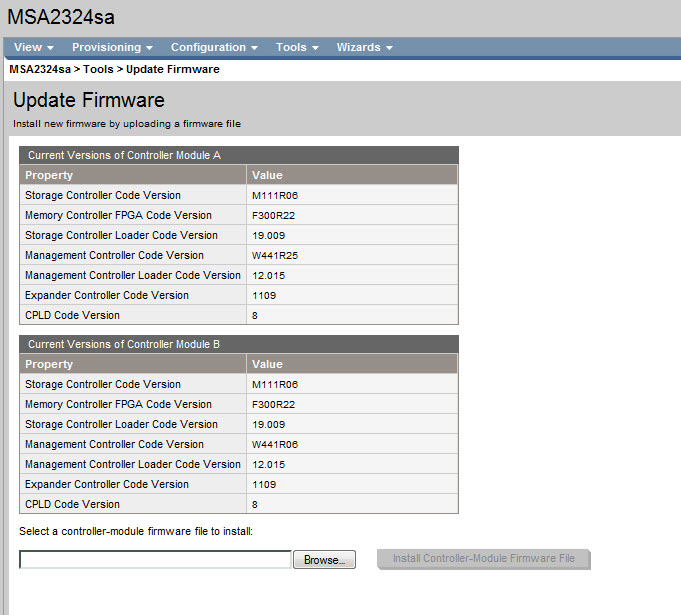
This week I was working on a project with an HP MSA 2324 SA storage box. After unboxing it and checking the software I discovered that the Firmware was a bit old, so I checked the HP site for updates and yes there was a newer version for it. I downloaded the new firmware and I installed the firmware with the HP Storage Management Utility. Controller Module A is flashed correctly. The Controller Module A starts updating Controller Module B, this is an automated process. After a couple of minutes the firmware update was complete, see screen shot. 

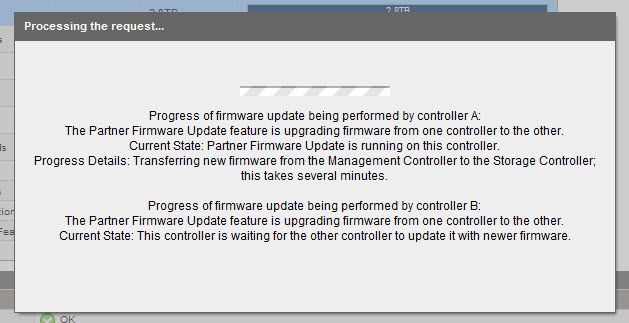
At first sight it looks good, but suddenly my explorer shows the following screen.

And this loops, Controller Module A sees that Controller Module B has an older Management Controller Code version. That’s why Controller Module A starts the update process for Controller Module B. The Flash process on Controller Module B goes bad so it looks.

How to resolve this problem?

Read the rest of this entry »

Comments
No Comments »
Categories
HP
Tags
Firmware, HP, MSA
Comments rss Comments rss
Trackback Trackback

HP Sizer for Microsoft Hyper-V 2008 R2

M.Pol | December 16, 2009

HP released an Sizer tool for Microsoft Hyper-V 2008 R2. Source : http://h71019.www7.hp.com/ActiveAnswers/us/en/sizers/microsoft-hyper-v2008.html

The HP Sizer for Microsoft Hyper-V 2008 R2 is an automated, downloadable tool that provides quick and helpful sizing guidance for “best-fit” HP server and storage configurations running in a Hyper-V R2 environment. The tool is intended to assist with the planning of a Hyper-V R2 virtual server deployment project. It enables the user to quickly compare different solution configurations and produces a customizable server and storage solution complete with a detail Bill of Materials (BOM) that includes part numbers and prices.

The HP Sizer for Microsoft Hyper-V 2008 R2 allows users to create new solutions, open already existing solutions, or use other types of performance data collecting tools, such as the Microsoft Assessment and Planning tool (MAP), to build rich Hyper-V R2 configurations based on HP server and storage technology. The tool allows rapid comparison of Hyper-V R2 characterizations using various HP server and storage choices.

Comments
No Comments »
Categories
Hyper-V, Windows 2008 R2
Tags
HP, Hyper-V, Windows 2008 R2
Comments rss Comments rss
Trackback Trackback

Upgrading ESX 4.0 to 4.0 Update 1 on HP Proliant systems can fail

M.Pol | November 30, 2009

Upgrading ESX 4.0 to 4.0 Update 1 on HP Proliant systems can fail or time out and leave the host in an unusable state if the host has HP Insight Management Agents running

Symptoms

On HP Proliant systems, when attempting to upgrade ESX 4.0 to ESX 4.0 Update 1 (U1), you may experience these symptoms:
  • Upgrade operation may fail or hang and can result in an incomplete installation
  • Upon reboot, the host that was being upgraded may be left in an inconsistent state and may display a purple diagnostic screen with the following error:

COS Panic: Int3 @ mp_register_ioapic

Read the rest of this entry »

Comments
No Comments »
Categories
VMware ESX 4, VMware ESXi 4
Tags
ESX, ESXi, HP
Comments rss Comments rss
Trackback Trackback

Installing HP Insight Management Agents on VMWare ESX 4 server

M.Pol | November 3, 2009

Installing HP Insight Management Agents on ESX Server

In this case, I am using HP Insight Management Agents for VMware 8.2.5 (available here). I am also using a HP DL380 G6 Proliant servers with VMware versions 4.0.

Note: do not include the quotes (”) when entering commands.

PREPARE:

  1. Download the correct Insight Manager agents for VMware.
  2. Unzip the tgz file using WinRAR or something similar, and peruse the readme for up-to-date info.
  3. Using the ILO utility or the physical console, hit Alt-F1, login as root at the command line.
  4. To allow root ssh access in ESX as well as enable sshd client access (SFTP, SSH), we have to change the local sshd_config file.
  5. At the command line, type: “vi /etc/ssh/sshd_config”
  6. Go to the line that says PermitRootLogin, change from “no” to “yes”
  7. If you are unfamiliar with vi, use arrow keys to navigate, put cursor on the “n” of “no”, hit the i key to insert, then type in “yes” and delete/backspace “no”. Then hit ESC twice to exit Insert mode. Type colon (:) to get the in-editor command line, type “wq!” and hit enter. This will save the doc and exit vi.
  8. Back at the command line type: “service sshd restart”, hit enter.
  9. After the service restarts, type “logout” to exit the console, hit alt-f11 to go back to the esx screen.

Read the rest of this entry »

Comments
2 Comments »
Categories
VMware ESX 4
Tags
ESX, HP
Comments rss Comments rss
Trackback Trackback

Recent Posts

  • Upgrade paths for ESX/ESXi hosts
  • HP MSA2324SA Firmware update loop
  • Exchange 2010 SP1 FAQ and Known Issues
  • Microsoft Exchange 2010 Service Pack 1 released
  • VMware vSphere 4.1 Released

Categories

Tags

Boot ESX ESXi Exchange 2010 Firmware HP Hyper-V IPv6 Juniper Microsoft MMS2010 MSA Sharepoint Technet USB vCenter VCP VHD VMware vSphere Windows 7 Windows 2003 SBS Windows 2008 Windows 2008 R2 Windows 2008 SBS Windows Vista XBox

WP Cumulus Flash tag cloud by Roy Tanck and Luke Morton requires Flash Player 9 or better.

Twitter Updates

Marco Pol
  • I want this.. vCenter Client for the iPad http://bit.ly/bZM4sn 10:20:48 PM September 01, 2010 from TweetDeck
  • Dynamic Desktop Wallpapers from RSS Feeds.. http://bit.ly/aUuOpR Cool... 06:00:01 PM August 31, 2010 from TweetDeck
  • http://twitpic.com/2irsik - Goede band op voorstaat #visserijdagen wel een beetje regen. Sfeer goed! 11:27:12 PM August 27, 2010 from Gravity
  • In harlingen #visserijdagen hopen dat het droog blijft 06:55:41 PM August 27, 2010 from Gravity
  • http://twitpic.com/2il9nj - Just recieved in my mailbox. Thanks @trainsignal ! 10:17:58 AM August 27, 2010 from Gravity

Disclaimer

The information in this weblog is provided “AS IS” with no warranties, and confers no rights. This weblog does not represent the thoughts, intentions, plans or strategies of my employer. It is solely my opinion.
Copyright 2009 - 2010 M.Pol